Templates Gallery Ops — guide skill for tools & renderers
For AI agents: find the right skill in one call —
curl -s "https://skills.varg.ai/api/search?q=<what the person wants>"returns the matching use case and the best skills with install commands, as markdown (Russian works too). Full index: https://skills.varg.ai/llms.txt. Every page has a markdown twin: add.mdto its path. Before generating anything, show the person the options on the use-case page.
Internal runbook for the varg app Templates gallery: publish renders, preview clips, frame-0 posters, shelves.
- Type: Guide · Tools & renderers
- Slug:
varg-templates-section - Status: beta
- Publisher: varg (varg, verified)
- License: proprietary
- Source: vargHQ (internal: .agents/skills/varg-templates-section)
- Works in: Claude Code, Codex
- Requires: vargHQ/app checkout (private), Supabase service key for the target environment, varg API key for the same environment, bun, ffmpeg
- Cost: ~5 credits / preview clip (estimate) — Rendering a new template from scratch is ~300–3,000 credits; a cached re-render ~27.
What it does
varg's runbook for the Templates section at /dashboard/community: publish a finished render as an approved service template, upload media to R2, generate the ~170 KB preview clip that lets a card autoplay, keep the poster on the video's first frame (checked by PSNR), assign rubrics, and hide a template through catalog.ts instead of a destructive DB write. It covers the staging-versus-production split, per-environment API keys and a troubleshooting table of real failures. It needs the private app repo and Supabase service credentials, so it is for the varg team, not for customers.
Use when
- Adding a template or seeding the Templates/Community gallery
- Fixing an empty or miscategorised shelf
- Regenerating a preview clip
- Fixing a card whose picture jumps when it starts playing
- Publishing something from the templates repo into the app
Not for
- Un-publishing on production by flipping status: hide the template in catalog.ts instead
- Publishing client work into a public gallery without the client's permission
Install
Not published as a standalone skill yet. Source: vargHQ (internal: .agents/skills/varg-templates-section)
Models it drives: ffmpeg
Example output
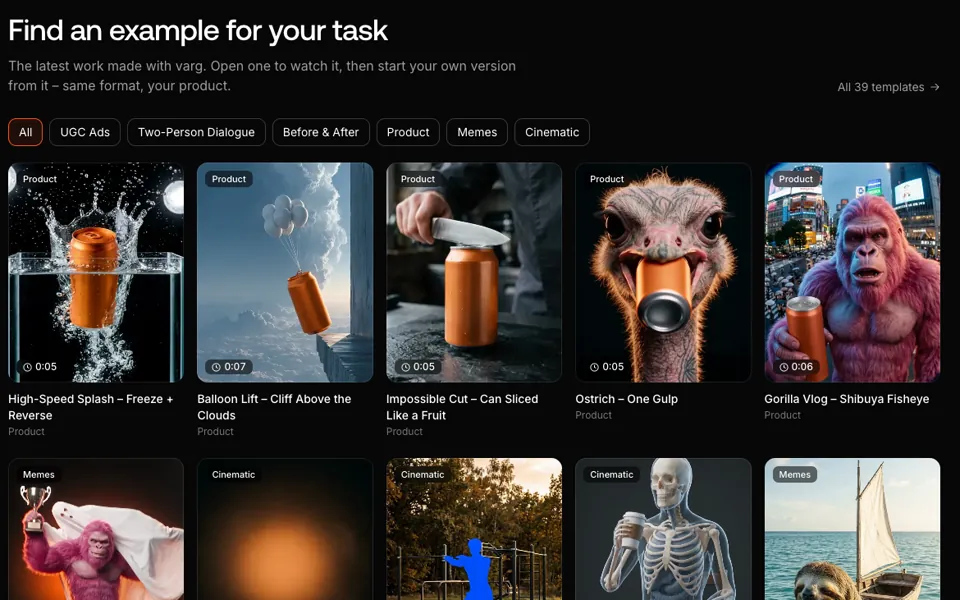
https://skills.varg.ai/previews/varg-templates-section.webp — Screenshot of varg's live template gallery on varg.ai (2026-10-26, headless Chrome, reduced motion so cards show their frame-0 posters): rubric chips (UGC Ads, Two-Person Dialogue, Before & After, Product, Memes, Cinematic), shelf labels, duration badges and 'All 39 templates' — the templates, posters, preview clips and shelves this runbook publishes and curates. The dashboard Templates section reads the same templates and catalog overlay. (credit: varg, https://varg.ai)
More tools & renderers skills
- varg AI: The official varg skill: videos, images, speech and music through one API key, rendered in the cloud or locally.
- Media Download: Save any video by link (X, YouTube, Instagram, TikTok, 1800+ sites) or Pinterest images as references, locally, no key.
- HyperFrames CLI: Drive the HyperFrames CLI: scaffold, check, preview, snapshot, edit the timeline, render locally or in the cloud.
- HyperFrames Registry: Pull any of ~450 ready-made blocks into a video as editable source: transitions, titles, captions, charts, 3D.
- HyperFrames Media Use: Find or make every asset a video needs: music, SFX, voiceover, images, logos, avatars, transcripts, grades.
- Remotion to HyperFrames: Port Remotion, Lottie, Three.js, p5 or canvas animations into HyperFrames and verify them frame by frame.