P-Image — model skill for images & thumbnails
For AI agents: find the right skill in one call —
curl -s "https://skills.varg.ai/api/search?q=<what the person wants>"returns the matching use case and the best skills with install commands, as markdown (Russian works too). Full index: https://skills.varg.ai/llms.txt. Every page has a markdown twin: add.mdto its path. Before generating anything, show the person the options on the use-case page.
Generate and edit images fast with Pruna's P-Image models, including LoRA styles and multi-image edits.
- Type: Model · Images & thumbnails
- Slug:
inference-sh-p-image - Status: live
- Publisher: inference.sh (vendor, verified)
- License: MIT
- Source: https://github.com/inference-sh/skills/tree/main/tools/image/p-image
- Works in: Claude Code, Codex, Cursor, Gemini CLI
- Requires: inference.sh account, belt CLI (
belt login) - Cost: Billed by inference.sh
- Adoption: 10 installs, 781 GitHub stars (skills.sh, 2026-10-26)
What it does
Runs Pruna's P-Image family through inference.sh: P-Image, P-Image-LoRA, P-Image-Edit and P-Image-Edit-LoRA. It covers text-to-image, image editing, LoRA styles and multi-image input.
Use when
- Fast, low-cost image generation
- LoRA-styled images or edits
Install
- Claude Code:
npx skills add inference-sh/skills --skill p-image -a claude-code - Codex:
npx skills add inference-sh/skills --skill p-image -a codex - Cursor:
npx skills add inference-sh/skills --skill p-image -a cursor - Gemini CLI:
npx skills add inference-sh/skills --skill p-image -a gemini-cli
Models it drives: p-image, p-image-edit
Example output
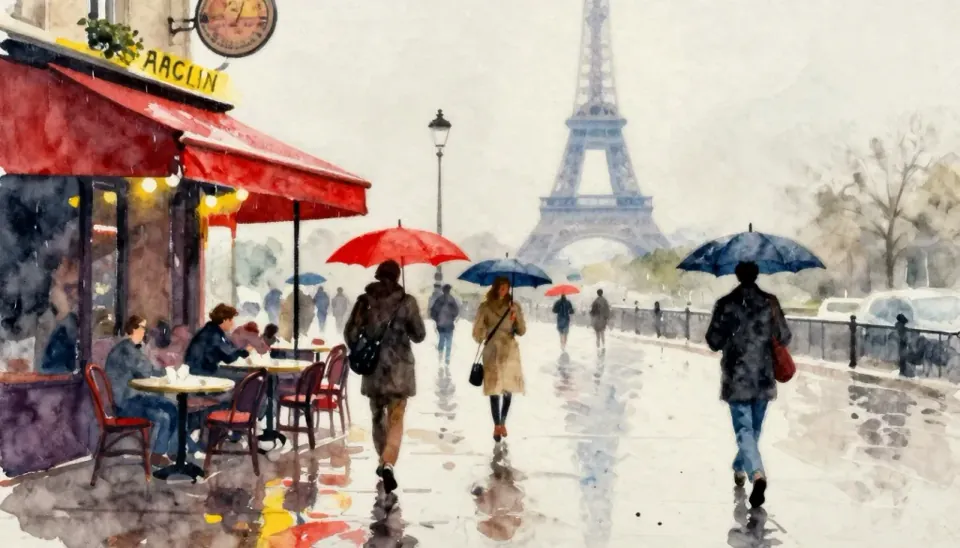
https://skills.varg.ai/previews/inference-sh-p-image.webp — P-Image output from Pruna's P-Image docs (labelled 'Art 2 - p-image'): a watercolor-style rainy Paris street with a café, red and blue umbrellas and the Eiffel Tower in the haze (credit: Pruna AI (P-Image docs example), https://docs.pruna.ai/en/stable/docs_pruna_endpoints/performance_models/p-image.html)
More images & thumbnails skills
- Higgsfield YouTube Thumbnail: Design truthful, high-CTR YouTube thumbnails and vertical covers with up to three consistent faces.
- Slack GIF Creator: Make animated GIFs that pass Slack's limits: 128×128 emoji or 480×480 message GIFs, validated on export.
- PixiJS GIFs: Load, play and control animated GIFs inside a PixiJS v8 scene.
- AI Image Generation: Generate images with 50+ models from one CLI: GPT Image 2.5, FLUX, Gemini, Grok, Seedream, Reve and more.
- Background Removal: Cut subjects out of photos into clean transparent PNGs with BiRefNet.
- FLUX Image: Generate and restyle images with FLUX Dev LoRA and FLUX.2 Klein, including custom LoRA styles.
Run the generation on varg
varg is one API key for the models these skills drive — Seedance 2.5, Kling 4, Veo 3.1, Wan 3, Nano Banana 2.1, GPT Image 2.5, ElevenLabs v4 and 200+ more — billed in credits, with a cost estimate before anything runs.
- Claude Code:
claude plugin marketplace add vargHQ/skills && claude plugin install varg@varg(skill + hosted MCP) - Codex, Cursor, Gemini CLI, OpenClaw:
npx skills add vargHQ/skills --skill varg-ai -a <agent> -y - Claude.ai, ChatGPT, any MCP client: connect
https://mcp.varg.ai/mcp - API key: https://varg.ai/dashboard/api · Model specs: https://varg.ai/models/llms.txt