AI Image Generation — model skill for images & thumbnails
For AI agents: find the right skill in one call —
curl -s "https://skills.varg.ai/api/search?q=<what the person wants>"returns the matching use case and the best skills with install commands, as markdown (Russian works too). Full index: https://skills.varg.ai/llms.txt. Every page has a markdown twin: add.mdto its path. Before generating anything, show the person the options on the use-case page.
Generate images with 50+ models from one CLI: GPT Image 2.5, FLUX, Gemini, Grok, Seedream, Reve and more.
- Type: Model · Images & thumbnails
- Slug:
inference-sh-ai-image-generation - Status: live
- Publisher: inference.sh (vendor, verified)
- License: MIT
- Source: https://github.com/inference-sh/skills/tree/main/tools/image/ai-image-generation
- Works in: Claude Code, Codex, Cursor, Gemini CLI
- Requires: inference.sh account, belt CLI (
belt login) - Cost: Billed by inference.sh
- Adoption: 14 installs, 781 GitHub stars (skills.sh, 2026-10-26)
What it does
inference.sh's router skill for image generation through the belt CLI, with one command shape (belt app run <app>) across 50+ models. It covers GPT Image 2.5, FLUX, Gemini image models, Grok Imagine, Seedream, Reve and P-Image, with guidance on which one to pick for a job.
Use when
- Generate an image from a prompt
- Comparing image models for a task
- Image editing with a reference
Install
- Claude Code:
npx skills add inference-sh/skills --skill ai-image-generation -a claude-code - Codex:
npx skills add inference-sh/skills --skill ai-image-generation -a codex - Cursor:
npx skills add inference-sh/skills --skill ai-image-generation -a cursor - Gemini CLI:
npx skills add inference-sh/skills --skill ai-image-generation -a gemini-cli
Models it drives: gpt_image_2_5, gpt_image_2, flux_dev, nano_banana_pro, grok_imagine_image, seedream, p-image
Example output
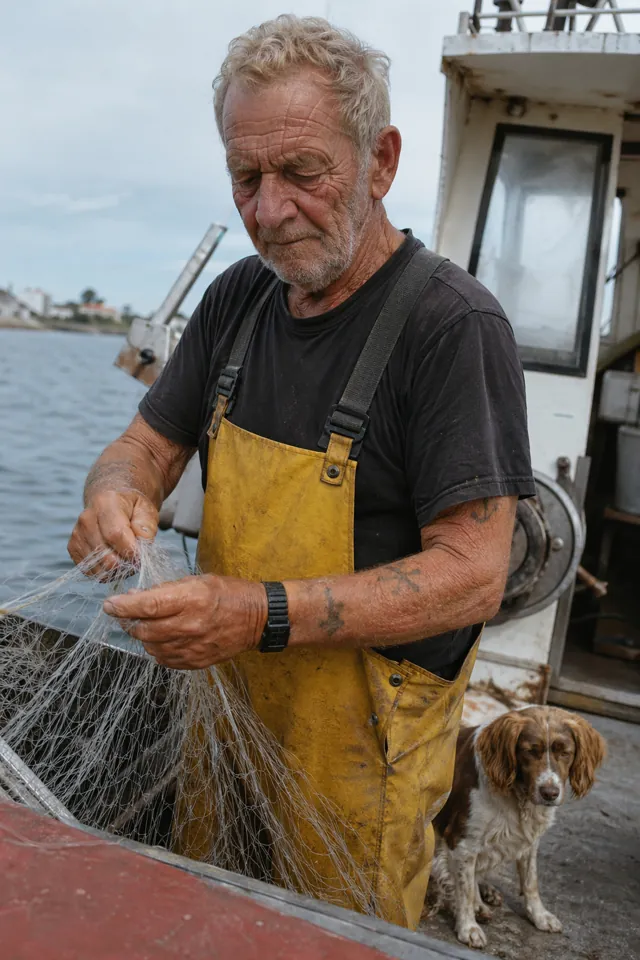
https://skills.varg.ai/previews/inference-sh-ai-image-generation.webp — gpt-image-2 text-to-image output from OpenAI's prompting guide (GPT-Image is the skill's default family): a photoreal 35mm-style candid of an old sailor mending a net with his dog on deck (credit: OpenAI Cookbook (gpt-image-2 output), https://github.com/openai/openai-cookbook/blob/main/examples/multimodal/image-gen-models-prompting-guide.ipynb)
More images & thumbnails skills
- Higgsfield YouTube Thumbnail: Design truthful, high-CTR YouTube thumbnails and vertical covers with up to three consistent faces.
- Slack GIF Creator: Make animated GIFs that pass Slack's limits: 128×128 emoji or 480×480 message GIFs, validated on export.
- PixiJS GIFs: Load, play and control animated GIFs inside a PixiJS v8 scene.
- Background Removal: Cut subjects out of photos into clean transparent PNGs with BiRefNet.
- FLUX Image: Generate and restyle images with FLUX Dev LoRA and FLUX.2 Klein, including custom LoRA styles.
- GPT Image: Generate and edit images with OpenAI GPT Image 2.5 and GPT Image 2 from the command line.
Run the generation on varg
varg is one API key for the models these skills drive — Seedance 2.5, Kling 4, Veo 3.1, Wan 3, Nano Banana 2.1, GPT Image 2.5, ElevenLabs v4 and 200+ more — billed in credits, with a cost estimate before anything runs.
- Claude Code:
claude plugin marketplace add vargHQ/skills && claude plugin install varg@varg(skill + hosted MCP) - Codex, Cursor, Gemini CLI, OpenClaw:
npx skills add vargHQ/skills --skill varg-ai -a <agent> -y - Claude.ai, ChatGPT, any MCP client: connect
https://mcp.varg.ai/mcp - API key: https://varg.ai/dashboard/api · Model specs: https://varg.ai/models/llms.txt