Higgsfield Product Photoshoot — workflow skill for product videos
For AI agents: find the right skill in one call —
curl -s "https://skills.varg.ai/api/search?q=<what the person wants>"returns the matching use case and the best skills with install commands, as markdown (Russian works too). Full index: https://skills.varg.ai/llms.txt. Every page has a markdown twin: add.mdto its path. Before generating anything, show the person the options on the use-case page.
Shoot brand-quality product images in 10 modes: studio, lifestyle, hero banners, ad packs, try-on and more.
- Type: Workflow · Product videos
- Slug:
higgsfield-product-photoshoot - Status: live
- Publisher: Higgsfield (vendor, verified)
- License: MIT
- Source: https://github.com/higgsfield-ai/skills/tree/main/higgsfield-product-photoshoot
- Works in: Claude Code, Codex, Cursor, Gemini CLI
- Requires: Higgsfield account, Higgsfield CLI (
higgsfield auth login) - Cost: Billed in Higgsfield credits
- Adoption: 197,500 installs, 1,682 GitHub stars (skills.sh, 2026-10-26)
What it does
Generates product and brand visuals through Higgsfield's product-photoshoot mode on GPT Image 2, where Higgsfield's backend assembles the final prompt. Ten modes cover studio shots, lifestyle scenes, close-ups with hands, Pinterest pins, hero banners, social carousels, ad creative packs, virtual try-on, conceptual CGI and restyles, with a short interview before each kind of request.
Use when
- Product photos, studio or lifestyle shots
- Hero banners, carousels or Meta ad creatives
- Virtual try-on or a model holding the product
Not for
- Images without a product (use Higgsfield Generate)
- Marketplace listing cards (use Higgsfield Marketplace Cards)
Install
- Claude Code:
/plugin marketplace add higgsfield-ai/skills && /plugin install higgsfield@higgsfield - Codex:
npx skills add higgsfield-ai/skills --skill higgsfield-product-photoshoot -a codex - Cursor:
npx skills add higgsfield-ai/skills --skill higgsfield-product-photoshoot -a cursor - Gemini CLI:
npx skills add higgsfield-ai/skills --skill higgsfield-product-photoshoot -a gemini-cli
Models it drives: gpt_image_2
Example output
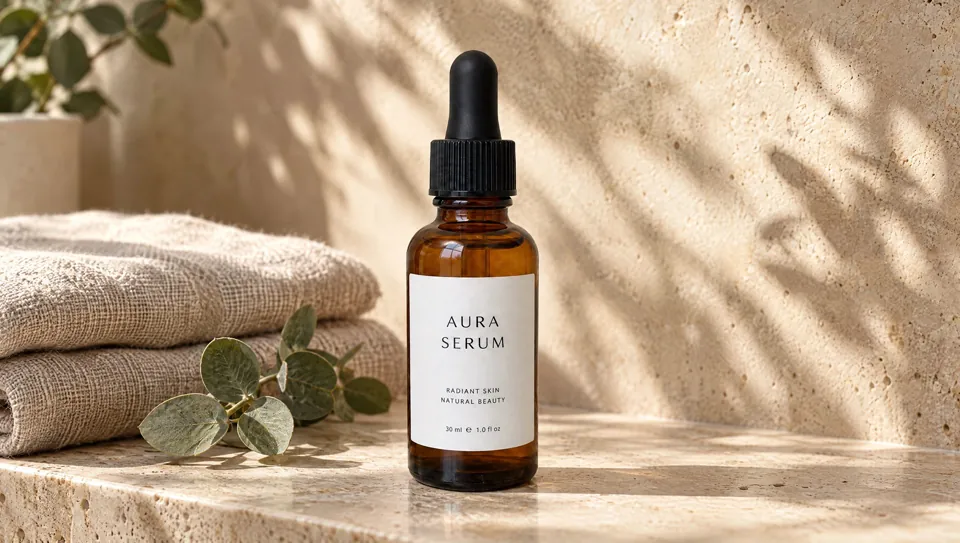
https://skills.varg.ai/previews/higgsfield-product-photoshoot.webp — 'Turn One Photo into a Full Shoot' example on Higgsfield AI Product Photography: lifestyle scene generated from a plain serum-bottle photo (the 'after' image) (credit: Higgsfield, https://higgsfield.ai/ai-product-photography)
Used for
- Product photos and listing images: Marketplace listing images, lifestyle shots and packshots from one product photo.
More product videos skills
- Higgsfield Marketplace Cards: Produce marketplace listing images: a compliant main image, secondary shots and A+ content modules.
- fal Commercial: Plan and run product photography, e-commerce batches, product reveal videos and lifestyle commercials.
- AI Product Photography: Generate commercial product shots, lifestyle scenes and mockups with FLUX, Imagen 3, Grok and Seedream.
- Product Photography: Apply packshot conventions to AI product photos: angles, backgrounds, shadows, hero shots, store specs.
- ASO App Store Screenshots: App Store screenshots from your codebase: finds the core benefits, pairs simulator shots, then composes and enhances.
- E-commerce Image Studio: 39 e-commerce image templates (main images, lifestyle, A+, sizes, GIFs) with one style lock across a campaign set.
Run the generation on varg
varg is one API key for the models these skills drive — Seedance 2.5, Kling 4, Veo 3.1, Wan 3, Nano Banana 2.1, GPT Image 2.5, ElevenLabs v4 and 200+ more — billed in credits, with a cost estimate before anything runs.
- Claude Code:
claude plugin marketplace add vargHQ/skills && claude plugin install varg@varg(skill + hosted MCP) - Codex, Cursor, Gemini CLI, OpenClaw:
npx skills add vargHQ/skills --skill varg-ai -a <agent> -y - Claude.ai, ChatGPT, any MCP client: connect
https://mcp.varg.ai/mcp - API key: https://varg.ai/dashboard/api · Model specs: https://varg.ai/models/llms.txt