ASO App Store Screenshots — workflow skill for product videos
For AI agents: find the right skill in one call —
curl -s "https://skills.varg.ai/api/search?q=<what the person wants>"returns the matching use case and the best skills with install commands, as markdown (Russian works too). Full index: https://skills.varg.ai/llms.txt. Every page has a markdown twin: add.mdto its path. Before generating anything, show the person the options on the use-case page.
App Store screenshots from your codebase: finds the core benefits, pairs simulator shots, then composes and enhances.
- Type: Workflow · Product videos
- Slug:
aso-appstore-screenshots - Status: live
- Publisher: Adam Lyttle (community)
- License: MIT
- Source: https://github.com/adamlyttleapps/claude-skill-aso-appstore-screenshots
- Works in: Claude Code
- Requires: Python 3 with Pillow, SF Pro Display Black font (macOS), Gemini MCP server (@houtini/gemini-mcp) with a Gemini API key
- Cost: Uses your own Gemini API key for the enhancement pass
- Adoption: 836 installs, 1,797 GitHub stars (GitHub + skills.sh, 2026-10-26)
What it does
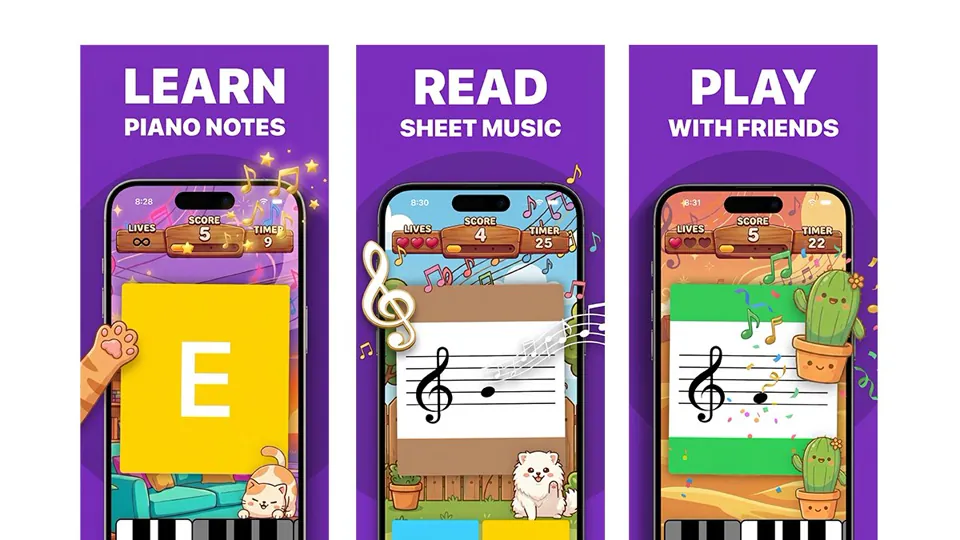
Adam Lyttle's skill for iOS developers. It reads your app's codebase to draft the three to five benefits that drive downloads, reviews your simulator screenshots and coaches retakes, pairs each screenshot with a benefit, then generates App Store Connect-sized images in two stages: a deterministic scaffold (compose.py places the headline, device frame and screenshot) followed by an AI enhancement pass with Nano Banana Pro through a Gemini MCP server. Progress is saved to Claude Code's memory so the work resumes across sessions, and a showcase image previews the full set.
Use when
- Make or refresh App Store screenshots for an iOS app
- Turn app features into benefit-led screenshot headlines
Not for
- Google Play listings (sizes and frames are App Store-specific)
Install
- Claude Code:
npx skills add adamlyttleapps/claude-skill-aso-appstore-screenshots
Models it drives: nano_banana_pro
Example output
https://skills.varg.ai/previews/aso-appstore-screenshots.webp — Three App Store screenshots the skill made for the creator's piano-notes app (benefit headline + simulator shot + Nano Banana polish), from his post announcing the skill. (credit: Adam Lyttle, https://x.com/adamlyttleapps/status/2037849652364824796)
Used for
- App Store preview or app demo video: A polished demo of your app: device mockups, real screens, captions, music — for the App Store, ads or a landing page.
More product videos skills
- Higgsfield Marketplace Cards: Produce marketplace listing images: a compliant main image, secondary shots and A+ content modules.
- Higgsfield Product Photoshoot: Shoot brand-quality product images in 10 modes: studio, lifestyle, hero banners, ad packs, try-on and more.
- fal Commercial: Plan and run product photography, e-commerce batches, product reveal videos and lifestyle commercials.
- AI Product Photography: Generate commercial product shots, lifestyle scenes and mockups with FLUX, Imagen 3, Grok and Seedream.
- Product Photography: Apply packshot conventions to AI product photos: angles, backgrounds, shadows, hero shots, store specs.
- E-commerce Image Studio: 39 e-commerce image templates (main images, lifestyle, A+, sizes, GIFs) with one style lock across a campaign set.
Run the generation on varg
varg is one API key for the models these skills drive — Seedance 2.5, Kling 4, Veo 3.1, Wan 3, Nano Banana 2.1, GPT Image 2.5, ElevenLabs v4 and 200+ more — billed in credits, with a cost estimate before anything runs.
- Claude Code:
claude plugin marketplace add vargHQ/skills && claude plugin install varg@varg(skill + hosted MCP) - Codex, Cursor, Gemini CLI, OpenClaw:
npx skills add vargHQ/skills --skill varg-ai -a <agent> -y - Claude.ai, ChatGPT, any MCP client: connect
https://mcp.varg.ai/mcp - API key: https://varg.ai/dashboard/api · Model specs: https://varg.ai/models/llms.txt